

May 18, 2026
Introduction
This tutorial explores the internals of the JSON library used by entity [“software”,”Ruby”,”CRuby interpreter”].
The archive contains:
- Native C parser implementation
- Native C generator implementation
- SIMD optimizations
- Floating-point conversion algorithms
- Buffer management infrastructure
- Ruby wrapper APIs
- JSON additions for Ruby core classes
- Build system integration
Repository structure:
json/├── parser/│ └── parser.c├── generator/│ └── generator.c├── simd/│ └── simd.h├── vendor/│ ├── fpconv.c│ ├── ryu.h│ └── jeaiii-ltoa.h├── fbuffer/│ └── fbuffer.h└── lib/json/
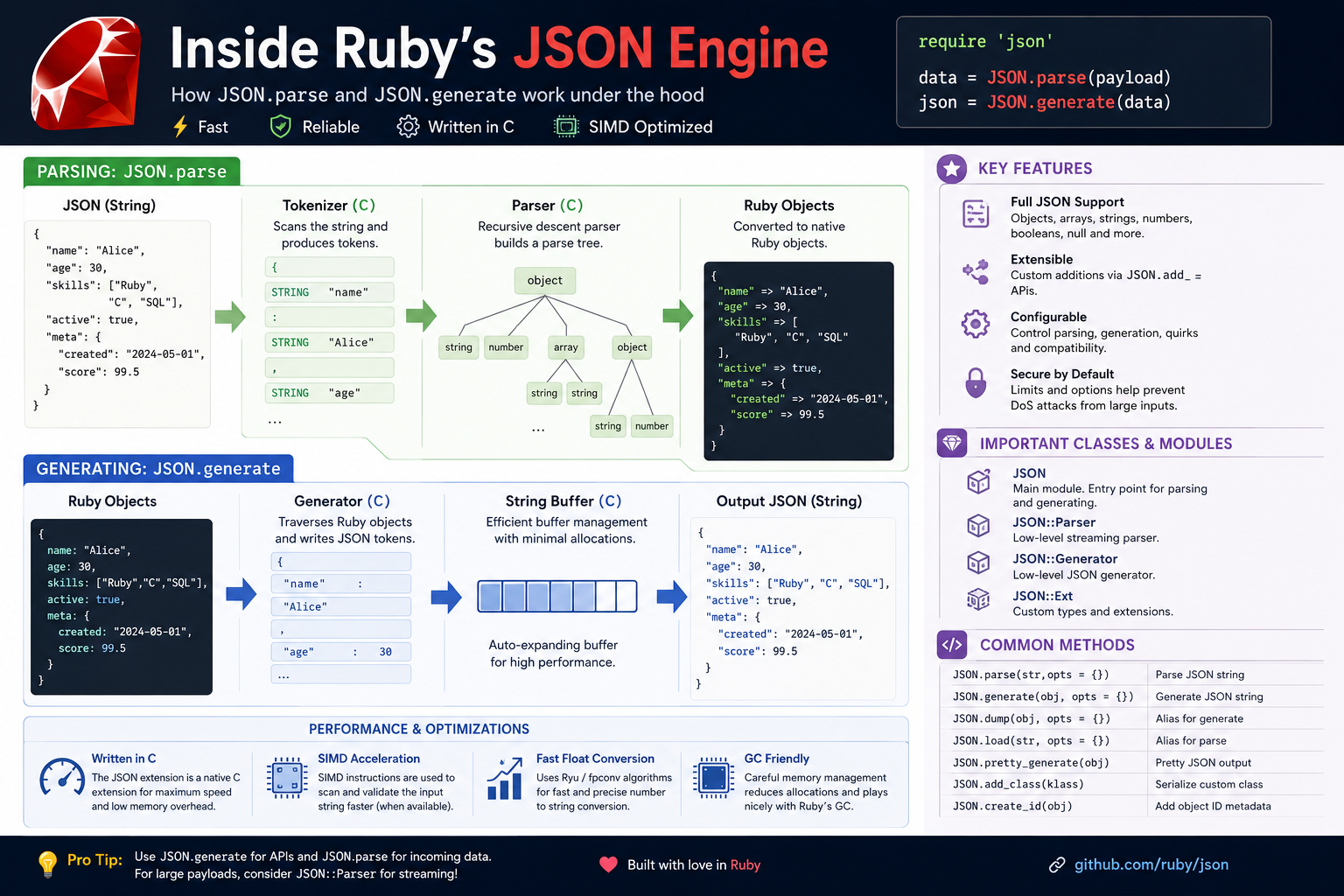
This tutorial covers the architecture, major APIs, internal methods, parsing pipeline, generator internals, memory management, and performance optimizations.


1. High-Level Architecture
Ruby’s JSON implementation consists of two primary components:
- Parser
- Generator
At the Ruby level:
JSON.parse(string)JSON.generate(object)
At the native level:
Ruby API ↓C extension bindings ↓Parser / Generator engines ↓Low-level buffer and serialization systems
The parser transforms JSON text into Ruby objects.
The generator transforms Ruby objects into JSON strings.
2. Ruby-Level Public APIs
Parsing JSON
require 'json'json = '{"name":"Ruby","year":1995}'obj = JSON.parse(json)
Result:
{ "name" => "Ruby", "year" => 1995}
Generating JSON
JSON.generate({name: 'Ruby'})
Result:
{"name":"Ruby"}
Pretty Generation
JSON.pretty_generate({ name: 'Ruby', version: '3.x'})
3. Parser Internals
File:
json/parser/parser.c
This is the heart of the JSON parser.
Responsibilities:
- Tokenization
- Recursive descent parsing
- String decoding
- Unicode handling
- Number parsing
- Object/array construction
- Error handling
- Memory management
4. Parsing Pipeline
The parser roughly follows this flow:
Input String ↓Tokenizer ↓Character Scanner ↓Value Dispatcher ↓Object/Array Builders ↓Ruby Object Creation
JSON values are identified and dispatched:
{["truefalsenullnumbers
Each token maps to a dedicated parsing routine.
5. Core JSON Types
JSON supports:
JSONRubyobjectHasharrayArraystringStringnumberInteger / Floattruetruefalsefalsenullnil
The parser dynamically creates Ruby VALUE objects internally.
6. VALUE and Ruby C API
CRuby internally represents all objects using VALUE.
Example:
VALUE obj;
This may represent:
- String
- Array
- Hash
- Integer
- Float
- Symbol
- Any Ruby object
The JSON extension heavily uses:
rb_hash_new()rb_ary_new()rb_utf8_str_new()INT2FIX()DBL2NUM()
These bridge native C code with Ruby objects.
7. String Parsing
String parsing is one of the most complicated parts.
The parser must handle:
- Escaped quotes
- UTF-8
- Unicode escapes
- Backslashes
- Control characters
Example JSON:
{"message":"hello\nworld"}
The parser converts:
\n
into a real newline.
Unicode sequences:
\u2764
must also be decoded.
8. Number Parsing
JSON numbers are tricky.
The parser must distinguish:
11.51e10-4.2
Ruby internally decides whether values become:
- Integer
- Float
- BigDecimal (optional)
The library contains specialized numeric conversion systems for speed.
9. Floating Point Conversion
Vendor directory:
json/vendor/
Includes:
- fpconv.c
- ryu.h
- jeaiii-ltoa.h
These are highly optimized algorithms for:
- float-to-string conversion
- integer formatting
- accurate serialization
This is extremely important because:
JSON.generate({pi: Math::PI})
must produce deterministic and accurate output.
10. Why Float Serialization Is Hard
Binary floating point cannot precisely represent many decimal values.
Example:
0.1 + 0.2
Result:
0.30000000000000004
JSON generators must:
- minimize precision loss
- avoid invalid representations
- serialize efficiently
- preserve round-trip accuracy
That is why Ruby vendors advanced algorithms.
11. The Ryu Algorithm
File:
vendor/ryu.h
Ryu is a modern high-performance float serialization algorithm.
Goals:
- shortest decimal representation
- exact round-tripping
- high performance
This is advanced systems engineering.
Most Ruby developers never realize JSON generation relies on sophisticated numerical algorithms.
12. Integer Serialization
File:
vendor/jeaiii-ltoa.h
Optimized integer-to-string conversion.
Why this matters:
JSON generation spends enormous time converting numbers into strings.
Even tiny optimizations can significantly impact:
- APIs
- Rails apps
- Sidekiq
- Redis pipelines
- GraphQL
- microservices
13. Generator Internals
File:
json/generator/generator.c
Responsibilities:
- object traversal
- string escaping
- numeric serialization
- recursion handling
- indentation
- encoding validation
- output buffering
14. Generator Pipeline
Ruby Object ↓Type Detection ↓Serializer Dispatch ↓Buffer Writer ↓Escaping / Formatting ↓Final JSON String
The generator recursively traverses Ruby objects.
Example:
{ user: { name: 'Alice' }}
becomes nested serializer calls.
15. Recursive Structures
JSON generators must protect against recursive objects.
Example:
arr = []arr << arr
This creates a circular reference.
Without protection:
infinite recursionstack overflow
The generator tracks visited objects internally.
16. String Escaping
The generator escapes:
- quotes
- backslashes
- control characters
- unicode sequences
Example:
JSON.generate({x: 'a\nb'})
Output:
{"x":"a\\nb"}
This is performance-critical.
17. Buffer Management
File:
fbuffer/fbuffer.h
The JSON generator avoids repeated Ruby string allocations.
Instead it uses internal expandable buffers.
Benefits:
- fewer allocations
- reduced GC pressure
- improved throughput
- lower memory fragmentation
This matters enormously in high-throughput Rails APIs.
18. SIMD Optimizations
File:
simd/simd.h
One of the most interesting parts of the library.
SIMD means:
Single Instruction Multiple Data
Modern CPUs can process multiple bytes simultaneously.
JSON parsing benefits heavily from:
- vectorized scanning
- delimiter detection
- quote searching
- whitespace skipping
This dramatically accelerates parsing.
19. Why SIMD Matters
Without SIMD:
scan one byte at a time
With SIMD:
scan 16–64 bytes simultaneously
This can massively improve throughput for:
- APIs
- streaming systems
- JSON-heavy services
- GraphQL
- telemetry pipelines
20. Ruby Additions
Directory:
lib/json/add/
Provides JSON serialization support for:
- Date
- Time
- BigDecimal
- Rational
- Complex
- Struct
- Set
- Range
- OpenStruct
- Exception
Example:
require 'json/add/time'JSON.generate(Time.now)
These additions extend Ruby core classes with JSON support.
21. GenericObject
File:
lib/json/generic_object.rb
Allows JSON objects to behave dynamically.
Example:
obj = JSON.parse(json, object_class: JSON::GenericObject)obj.user.name
Instead of:
obj['user']['name']
22. State Objects
File:
lib/json/ext/generator/state.rb
State objects configure generation behavior.
Options include:
- indentation
- spacing
- ascii-only mode
- max nesting
- circular reference handling
Example:
JSON.generate(obj, indent: ' ')
23. Extension Build System
Files:
extconf.rb
Ruby uses mkmf to compile native extensions.
Typical flow:
extconf.rb ↓Makefile generation ↓Native compilation ↓Shared library
This is how:
json/ext/parser.so
gets produced.
24. Memory Management
Native extensions must cooperate with Ruby’s garbage collector.
The JSON extension carefully manages:
- object references
- temporary allocations
- parser buffers
- recursion state
Incorrect handling would cause:
- segmentation faults
- memory corruption
- leaks
- GC crashes
25. Error Handling
Parser errors become Ruby exceptions.
Example:
JSON.parse('{')
Raises:
JSON::ParserError
Internally:
rb_raise(...)
creates Ruby exceptions from C.
26. Encoding Handling
JSON requires Unicode support.
The parser validates:
- UTF-8 correctness
- escape sequences
- invalid byte patterns
Ruby’s encoding system integrates deeply with the parser.
27. Performance Characteristics
The native extension is dramatically faster than pure Ruby parsing.
Reasons:
- direct memory access
- fewer allocations
- optimized loops
- SIMD support
- specialized serialization algorithms
- buffer reuse
This is why the C extension remains essential.
28. JSON and Rails
Rails depends heavily on JSON.
Used everywhere:
- APIs
- ActiveSupport
- ActionCable
- Turbo
- GraphQL
- serializers
- Redis payloads
That means Ruby’s JSON extension is one of the most performance-critical libraries in the ecosystem.
29. Security Considerations
JSON parsers must defend against:
- deeply nested structures
- huge payloads
- invalid UTF-8
- malicious recursion
- parser bombs
The library includes limits and validation logic for safety.
30. Final Thoughts
Ruby’s JSON library is far more sophisticated than most developers realize.
Under a simple API:
JSON.parse(json)
exists:
- native C parsers
- SIMD acceleration
- advanced numeric serialization
- memory management systems
- Unicode handling
- recursive traversal engines
- buffer optimization infrastructure
This library represents decades of accumulated runtime engineering and performance work inside the Ruby ecosystem.