
March 25, 2026
Published on RubyStackNews
Ruby is a high-level language. C is a low-level language. At some point, every serious Ruby application needs to cross that boundary.
Maybe you need a cryptography library. Maybe a signal processing engine. Maybe a hardware interface. Maybe raw performance on a hot path.
There are two ways to make Ruby speak C. This article covers both, explains when to use each, and shows you the code for real.
The two paths
Path 1 -- FFI gem Ruby calls C functions at runtime. No C code needed. Just Ruby. Works on MRI, JRuby, TruffleRuby.Path 2 -- C extension You write C code that integrates with the Ruby C API. The C objects become native Ruby objects. Zero overhead. MRI only.
Both paths are legitimate. Both are used in production gems. The right choice depends on what you are building.
Path 1: FFI gem
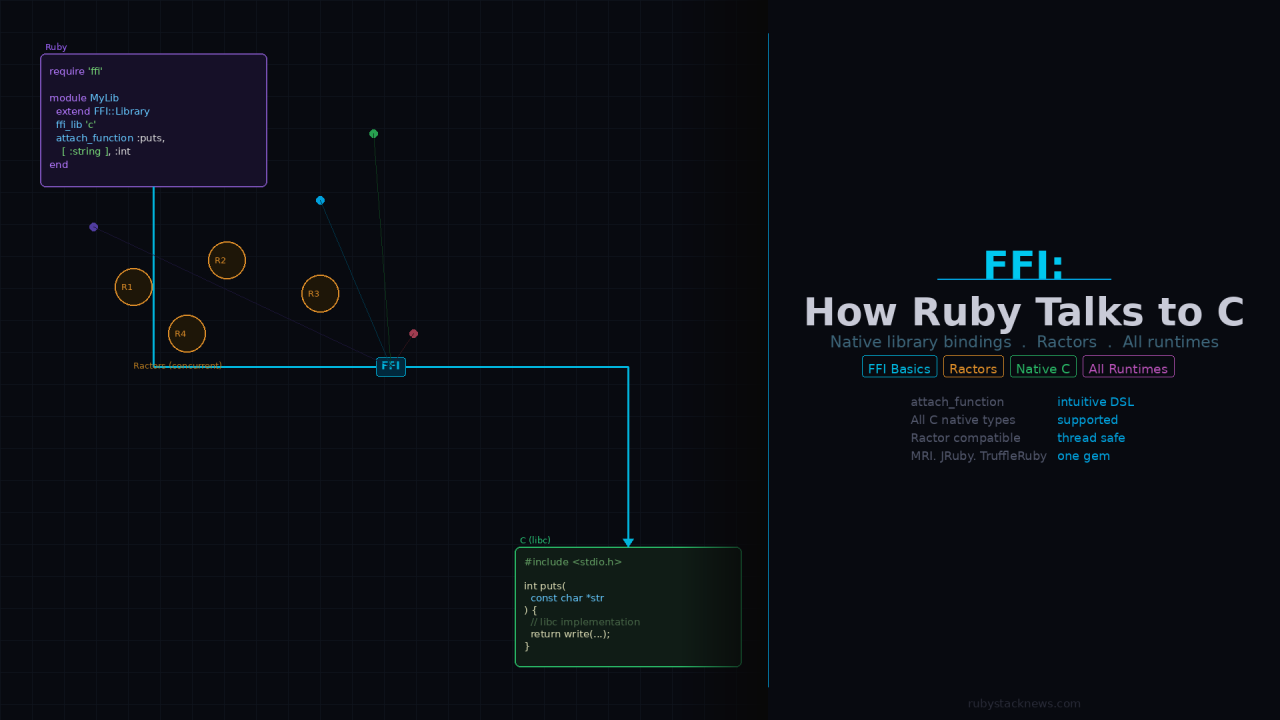
FFI stands for Foreign Function Interface. The gem lets you load a native shared library and call its functions directly from Ruby, using a clean DSL.
Installation
gem install ffi
On CRuby you need a C compiler. On JRuby and TruffleRuby, FFI is preinstalled. require ‘ffi’ works without installing anything.
Basic usage
require 'ffi'module MyLib extend FFI::Library ffi_lib 'c' attach_function :puts, [ :string ], :intendMyLib.puts 'Hello from libc via FFI.'
ffi_lib ‘c’ loads the C standard library. attach_function binds the puts function by declaring its argument types and return type. Then you call it like any Ruby method.
The type system
FFI supports all C native types:
:int # C int:uint # unsigned int:long # long:float # float:double # double:string # const char * (null-terminated):pointer # void * (generic pointer):bool # _Bool:void # void# Sized types:int8 :uint8 :int16 :uint16 :int32 :int64
A real example: binding libm
require 'ffi'module CMath extend FFI::Library ffi_lib 'm' # libm -- the C math library attach_function :sin, [ :double ], :double attach_function :cos, [ :double ], :double attach_function :pow, [ :double, :double ], :double attach_function :log, [ :double ], :double attach_function :floor, [ :double ], :double attach_function :ceil, [ :double ], :doubleendputs CMath.sin(Math::PI / 2) # 1.0puts CMath.pow(2.0, 10.0) # 1024.0puts CMath.log(Math::E) # 1.0
Structs
FFI handles C structs with a Ruby class:
class Point < FFI::Struct layout :x, :int, :y, :intendpoint = Point.newpoint[:x] = 100point[:y] = 200puts point[:x] # 100
Nested structs, arrays of structs, and bit fields all work. FFI handles the memory layout and padding automatically.
Callbacks from C to Ruby
You can pass a Ruby block to a C function that expects a function pointer:
module Sorter extend FFI::Library ffi_lib 'c' callback :comparator, [ :pointer, :pointer ], :int attach_function :qsort, [ :pointer, :size_t, :size_t, :comparator ], :voidendcomparator = FFI::Function.new(:int, [:pointer, :pointer]) do |a, b| a.read_int <=> b.read_intendSorter.qsort(buffer, count, element_size, comparator)
C calls your Ruby block. Ruby runs. Control returns to C. Completely transparent.
FFI with Ractors
Ruby 3 introduced Ractors for true parallelism. Most Ruby objects are not shareable between Ractors. FFI is the exception.
FFI functions and memory live outside the Ruby object space. C memory is not subject to Ruby object ownership rules. This makes FFI naturally safe to use across Ractors.
require 'ffi'module MathLib extend FFI::Library ffi_lib 'm' attach_function :sqrt, [ :double ], :doubleend# Run FFI calls in parallel Ractors -- no GVL, true parallelismractors = 8.times.map do |i| Ractor.new(i) do |n| MathLib.sqrt(n * 1000.0) endendresults = ractors.map(&:take)puts results.inspect
Each Ractor calls sqrt independently with no GVL contention. No shared Ruby state. True parallel execution.
For computationally heavy work — image processing, signal analysis, numerical computation — this opens real parallelism in Ruby via FFI and native C libraries.
# Parallel image processing across Ractors via FFIstrips = split_image_into_strips(image, count: 8)ractors = strips.map do |strip| Ractor.new(strip) do |s| ImageLib.process_strip(s.ptr) s endendprocessed = ractors.map(&:take)combine_strips(processed)
Path 2: C extension
A C extension goes further than FFI. Instead of calling C functions from Ruby, you write C code that integrates directly with the Ruby runtime. Your C objects become native Ruby objects. Your C functions become Ruby methods.
The Ruby C API
Every Ruby object is a VALUE in C. The C API provides macros and functions to create, manipulate, and return Ruby objects:
#include "ruby.h"static VALUE my_add(VALUE self, VALUE a, VALUE b) { int x = NUM2INT(a); int y = NUM2INT(b); return INT2NUM(x + y);}void Init_myext() { VALUE mod = rb_define_module("MyExt"); rb_define_method(mod, "add", my_add, 2);}
After compiling this as a shared library, Ruby loads it and add is available as a native method:
require 'myext'include MyExtputs add(3, 4) # 7
Wrapping a C struct as a Ruby object
The most powerful pattern is wrapping a C struct as a Ruby object using TypedData_Wrap_Struct. The struct lives in C memory, managed by Ruby’s garbage collector:
static void my_struct_free(void *ptr) { my_struct_destroy((MyStruct *)ptr);}static const rb_data_type_t my_struct_type = { "MyStruct", { NULL, my_struct_free, NULL }, NULL, NULL, RUBY_TYPED_FREE_IMMEDIATELY};static VALUE my_struct_new(VALUE klass) { MyStruct *s = my_struct_create(); return TypedData_Wrap_Struct(klass, &my_struct_type, s);}static VALUE my_struct_compute(VALUE self, VALUE x) { MyStruct *s; TypedData_Get_Struct(self, MyStruct, &my_struct_type, s); return DBL2NUM(my_struct_do_work(s, NUM2DBL(x)));}
From Ruby, MyStruct.new returns an object backed by a C struct. Calling .compute(x) runs C code directly. When Ruby’s GC collects the object, my_struct_free is called automatically. No memory leaks.
The extconf.rb
C extensions ship with an extconf.rb that generates the Makefile:
require 'mkmf'find_library('mylib', 'mylib_init')find_header('mylib.h')create_makefile('myext')
ruby extconf.rbmake
This compiles the extension and produces a .so (or .bundle on macOS) that Ruby loads with require.
Choosing between FFI and C extension
Use FFI when: You are binding an existing C library you did not write. You want the code to work on JRuby and TruffleRuby. You want to avoid writing C code entirely. The function call overhead (small but real) is acceptable. You need Ractor compatibility out of the box.Use a C extension when: You are building something new that needs maximum performance. You want C structs to be first-class Ruby objects. You need tight GC integration (finalizers, mark functions). You are targeting MRI only and need zero overhead. The Ruby C API control is worth the complexity.
Both approaches are used in major production gems. Nokogiri uses a C extension. Many database adapters use FFI. The right choice depends on what you are wrapping and who needs to use it.
What becomes possible
Once you understand both paths, the entire C ecosystem is available to Ruby:
- Cryptography (libsodium, OpenSSL internals)
- Signal processing (FFTW for Fourier transforms)
- Linear algebra (BLAS, LAPACK)
- Image and video codecs
- Hardware interfaces (GPIO, serial ports, USB)
- Platform system calls
- High-performance numerical libraries
Any shared library on the system is one ffi_lib call away. Any C struct can become a Ruby object with a C extension.
Ruby is a high-level language that can reach all the way down to the metal when it needs to. FFI and C extensions are the two bridges that make that possible.
- Ruby FFI gem: https://github.com/ffi/ffi
- FFI wiki and projects: https://github.com/ffi/ffi/wiki
- Ruby C extension guide: https://docs.ruby-lang.org/en/master/extension_rdoc.html
German Silva ( @ruby_stack_news )

 Linking Ruby knowledge from the most remote places in the world.