
March 1, 2026
The Modern CLI Stack Beyond puts
Ruby is often associated with web applications, background jobs, and scripting. But quietly — almost underground — a rich ecosystem has emerged for building modern, interactive, polished terminal applications.
Not the old “print some text and parse ARGV” style.
We’re talking about tools that feel closer to Git, Docker, npm, or Rust CLIs — responsive, colorful, user-friendly, and production-ready.
If you’re building developer tools, automation pipelines, DevOps utilities, or system interfaces, Ruby can absolutely deliver a first-class terminal UX.
Let’s explore the modern stack.
🧭 Command Structure: Thor
Thor is the backbone of many serious Ruby CLIs — including Rails itself.
It provides:
- Command routing
- Subcommands
- Flags and arguments
- Built-in help generation
- Clean DSL
require "thor"class MyCLI < Thor desc "hello NAME", "Greet a user" def hello(name) puts "Hello #{name}" endendMyCLI.start(ARGV)Suddenly your script behaves like a real tool:
$ mycli hello GermánHello Germán🎛️ Interaction Layer: TTY Toolkit
The modern Ruby terminal UX ecosystem revolves around the excellent TTY family of gems.
Prompts and Menus
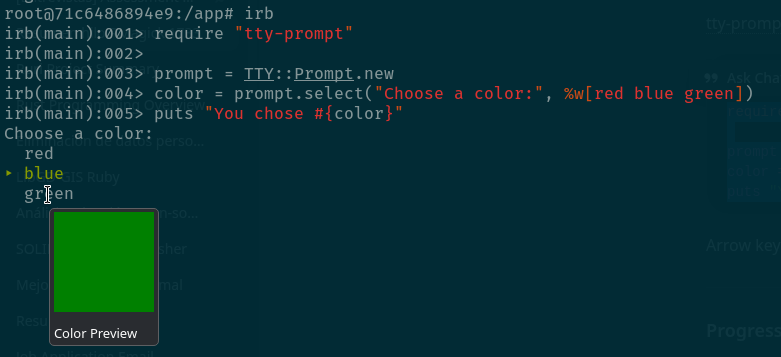
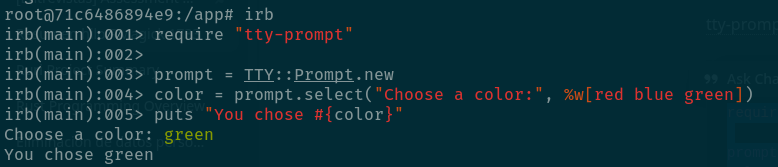
tty-prompt enables rich interactive input:
require "tty-prompt"prompt = TTY::Prompt.newcolor = prompt.select("Choose a color:", %w[red blue green])puts "You chose #{color}"Arrow keys, selection menus, confirmations — all out of the box.
Progress Bars
tty-progressbar provides polished feedback for long operations:
require "tty-progressbar"bar = TTY::ProgressBar.new("Processing [:bar] :percent", total: 100)100.times do sleep 0.02 bar.advanceendSpinners (Instant Professional Feel)
tty-spinner adds animated feedback — a tiny detail that dramatically improves perceived performance.
require "tty-spinner"spinner = TTY::Spinner.new("[:spinner] Loading data...", format: :pulse_2)spinner.auto_spinsleep 2spinner.success("(done)")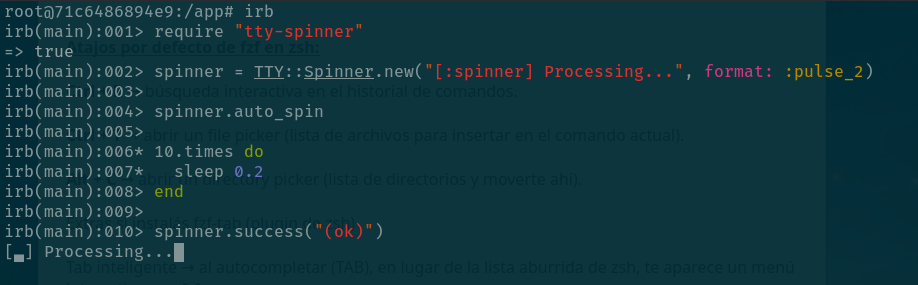
🎨 Output Styling
Readable output is essential.
Color and Styles
colorize remains a lightweight classic:
require "colorize"puts "Success".green.boldputs "Warning".yellowputs "Error".white.on_redFor truecolor terminals, many developers prefer Rainbow or Pastel, but colorize is still widely used and dependency-free.
🧱 Layout and Structure
You can go further and build dashboard-like outputs.
Boxes and Framing
tty-box creates clean visual sections:
require "tty-box"puts TTY::Box.frame( title: "Ruby CLI", width: 40, height: 5) { "Modern terminal UI" }Tables
tty-table displays structured data elegantly:
require "tty-table"table = TTY::Table.new( ["Gem", "Purpose"], [["Thor", "CLI framework"], ["TTY", "UI toolkit"]])puts table.render(:unicode)🚀 Putting It Together — A Mini Modern CLI
require "thor"require "tty-prompt"require "tty-spinner"require "colorize"class DemoCLI < Thor desc "run", "Run demo tool" def run prompt = TTY::Prompt.new name = prompt.ask("Your name?") spinner = TTY::Spinner.new("[:spinner] Preparing...", format: :dots) spinner.auto_spin sleep 2 spinner.stop puts "Welcome #{name}!".green.bold endendDemoCLI.start(ARGV)This tiny program already feels closer to a professional tool than a script.
🧠 Where Ruby CLIs Shine
Ruby excels when development speed and expressiveness matter more than raw binary performance.
Typical sweet spots include:
- Developer tooling
- Automation scripts
- Deployment helpers
- Data pipelines
- Infrastructure tools
- Interactive installers
- Internal company utilities
- OSS command-line apps
- Embedded or SSH-only environments
Ruby’s strength is turning ideas into working tools quickly — often faster than compiled languages.
⚖️ Ruby vs Other CLI Ecosystems
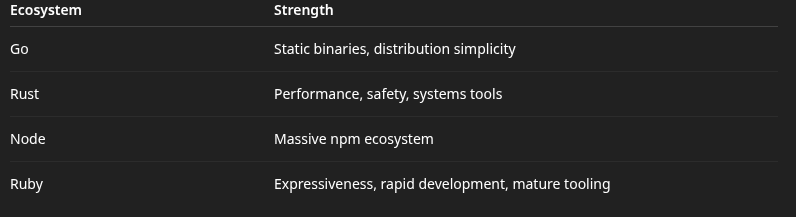
Ruby may not produce a single static binary by default, but for many real-world tools, it offers the best balance of power and productivity.
🏁 Final Thoughts
Ruby’s terminal ecosystem is quietly thriving.
With Thor for structure and TTY for interaction, you can build CLIs that feel modern, responsive, and genuinely pleasant to use — far beyond simple scripts.
If your mental model of Ruby tooling is still puts and option parsing, it may be time to update it.
Ruby isn’t just for the web. It’s an excellent language for building beautiful tools.

 Linking Ruby knowledge from the most remote places in the world.