
January 8, 2026
I’ve been quietly working on two Ruby libraries that are starting to click together in a really interesting way:
- libgd-gis — the GIS brain: maps, basemaps, lines, polygons
- ruby-libgd — the raster engine: pixels, alpha, image scaling, compositing
Over the last days I added:
- lines, polygons and basemap switching to libgd-gis (0.1.3)
- color_alpha and copy_resize to ruby-libgd (0.1.9)
And together, that combination suddenly gives Ruby something it never had before:
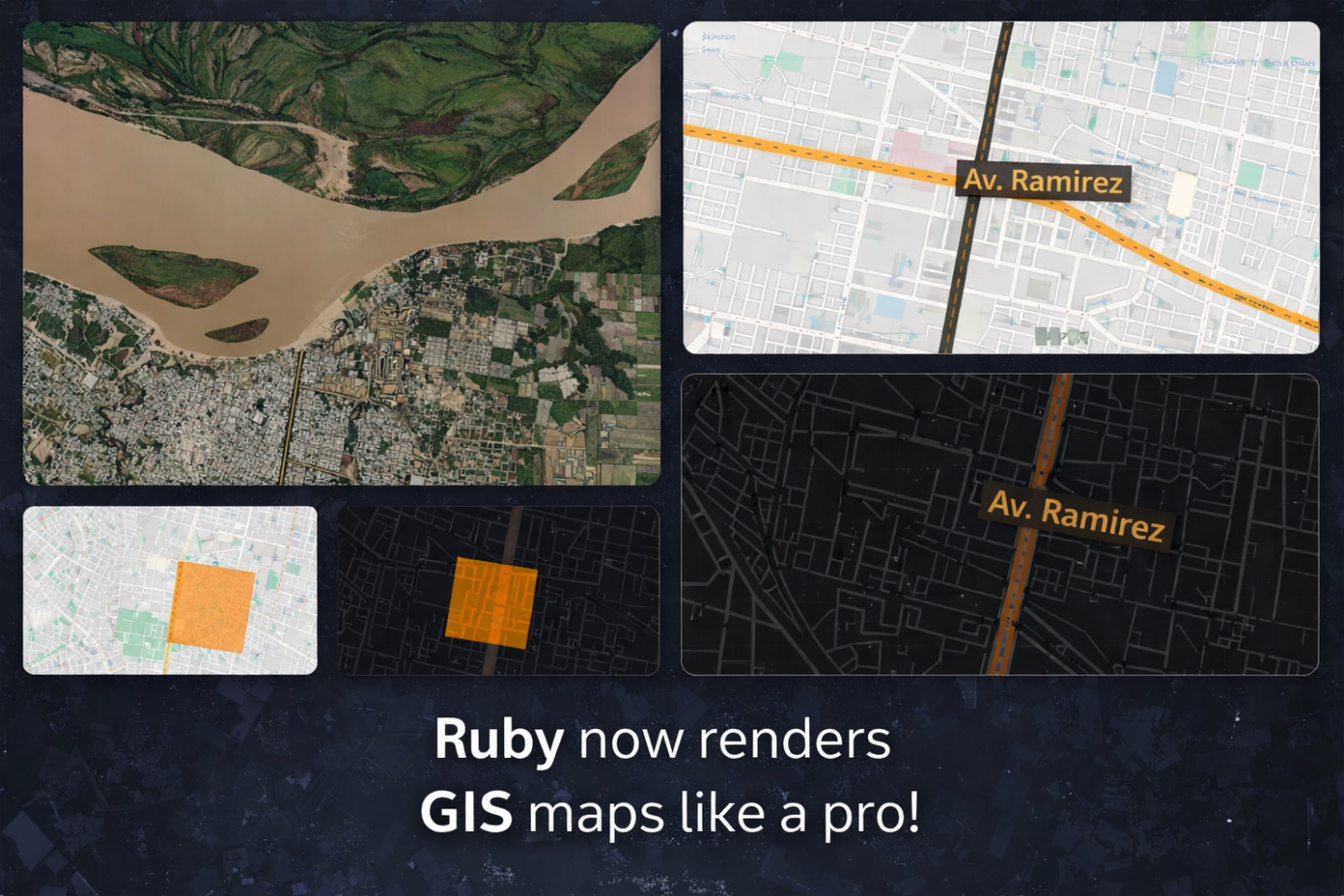
the ability to render the same GIS scene over different map styles, just like a real GIS engine.
🟥 ruby-libgd
Native Ruby raster engine with alpha blending, image scaling, filters and pixel-level drawing.
RubyGems Source code🗺️ libgd-gis
GIS rendering for Ruby: basemaps, lines, polygons and projections built on top of ruby-libgd.
RubyGems Source codeWho does what?
It is important to keep this clear:
LibraryResponsibilitylibgd-gisGIS logic: bbox, projection, basemaps, lines, polygonsruby-libgdRaster engine: RGBA, alpha blending, image scaling, drawing
libgd-gis decides what the map is. ruby-libgd decides how it is drawn in pixels.
That separation is exactly how professional GIS pipelines work.
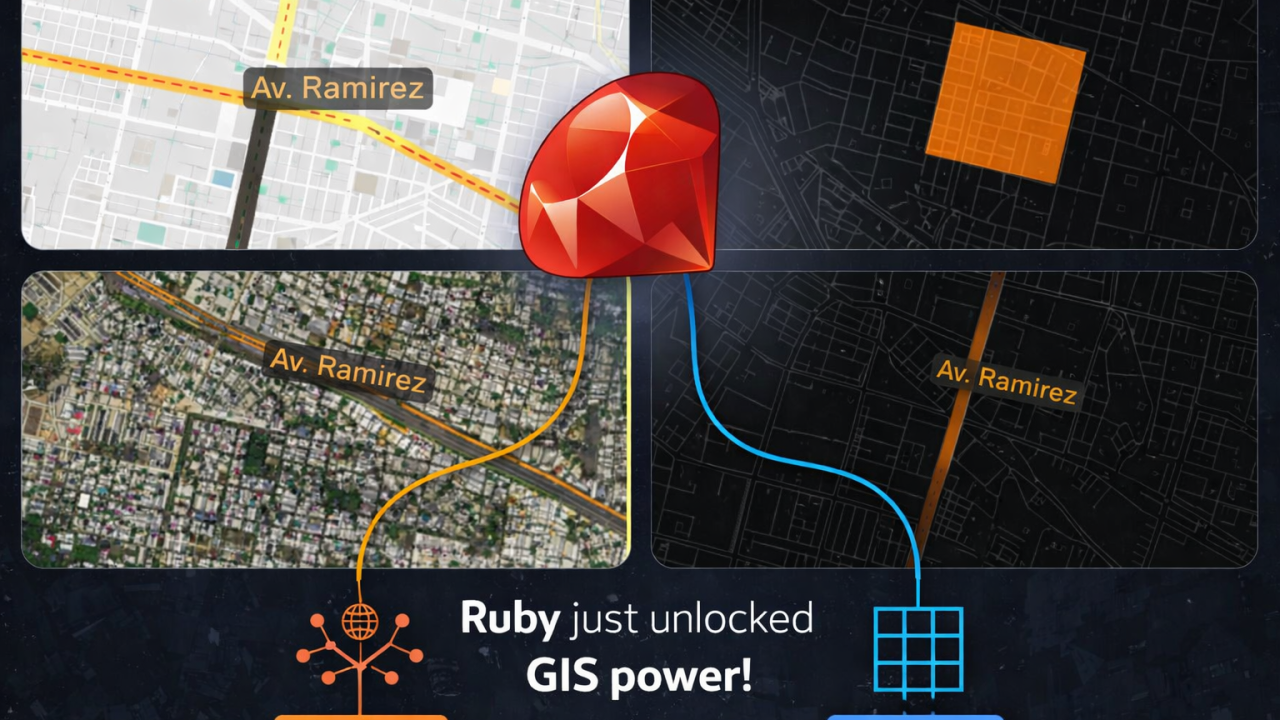
Example 1 — Drawing a real avenue on a cartographic map
This example loads Avenida Ramírez from OpenStreetMap data and renders it as a real road, on top of a Carto basemap.
require "json"
require "gd/gis"

# Paraná bbox (tile-aligned)
BBOX = [-60.556640625, -31.8402326679, -60.46875, -31.6907818061]

map = GD::GIS::Map.new(
  bbox: BBOX,
  zoom: 14,
  basemap: :carto_light
)

# Load Av. Ramírez from OSM GeoJSON
geo = JSON.parse(File.read("ramirez_full.geojson"))
features = geo["features"]

# Draw the avenue as a real street
map.add_lines(
  features,
  stroke: [0, 0, 0, 90],   # road border
  fill:   [0, 0, 0, 90],   # road body
  width:  50              # width in meters
)

map.add_lines(
  features,
  stroke: [255, 165, 0, 90],
  width:  2
)

# Label
map.add_points(
  [{ lon: -60.5205, lat: -31.76, name: "Av. Ramírez" }],
  lon: ->(p){ p[:lon] },
  lat: ->(p){ p[:lat] },
  label: ->(p){ p[:name] },
  font: "./fonts/DejaVuSans.ttf",
  size: 16,
  color: [0,0,0,160],
  icon: "mark.png"
)

map.render
map.save("ramirez_gis.png")

puts "Generated ramirez_gis.png"
This is not just a drawing. libgd-gis interprets the geometry, and ruby-libgd composites it over the basemap with proper alpha blending.

Example 2 — A semi-transparent polygon over a dark basemap
Here is a simple square polygon rendered over a dark map style:
require "gd/gis"

BBOX = [-60.53, -31.77, -60.51, -31.74]

map = GD::GIS::Map.new(
  bbox: BBOX,
  zoom: 15,
  basemap: :carto_dark
)

polygon = [
  [-60.525, -31.750],
  [-60.520, -31.750],
  [-60.520, -31.755],
  [-60.525, -31.755],
  [-60.525, -31.750]
]

map.add_polygons(
  [polygon],
  fill:   [255, 140, 0, 120],   # semi-transparent orange
  stroke: [0, 0, 0, 200],
  width:  2
)

map.render
map.save("test_carto_dark.png")

puts "Generated test_carto_dark.png"
The key here is [255, 140, 0, 120] — that alpha channel is handled by ruby-libgd 0.1.9, which allows the polygon to blend correctly over dark tiles.

Advertise on RubyStackNews
RubyStackNews is a niche publication read by Ruby and Rails developers worldwide. Our audience includes senior engineers, tech leads, and decision-makers from the US, Europe, and Asia.
Sponsorship Options
Your brand featured inside a technical article (clearly marked as sponsored).
Highlighted sponsor section embedded within an article.
Logo + link displayed site-wide in the sidebar.
- Highly targeted Ruby / Rails audience
- Organic traffic from search and developer communities
- No ad networks — direct sponsorships only
Interested in sponsoring RubyStackNews?
Contact via WhatsAppWhy color_alpha and copy_resize matter
Two new features in ruby-libgd 0.1.9 made all this possible:
color_alpha
True RGBA blending. Without it, semi-transparent GIS overlays would either hide the map or look wrong.
Now polygons, lines and labels blend correctly over:
- light maps
- dark maps
- satellite imagery
copy_resize
This allows basemap tiles to be scaled and composited correctly to the final viewport.
That is what makes basemap switching work:
- Carto light
- dark maps
- clean vector styles
- satellite imagery
All from the same GIS scene.
What this unlocks
libgd-gis defines the scene:
lines, polygons, bbox, basemap
ruby-libgd renders it:
raster tiles, alpha blending, compositing, output image
Together, Ruby can now do:
- zoning maps
- satellite overlays
- urban planning
- analytical maps
- tile-style GIS rendering
Which is honestly something I never expected to be possible in Ruby a few months ago.
But here we are.
And this is just the beginning.

 Linking Ruby knowledge from the most remote places in the world.