
March 30, 2026
Reading time: 8 minutes
Status: Benchmark-driven, production-ready
Executive Summary
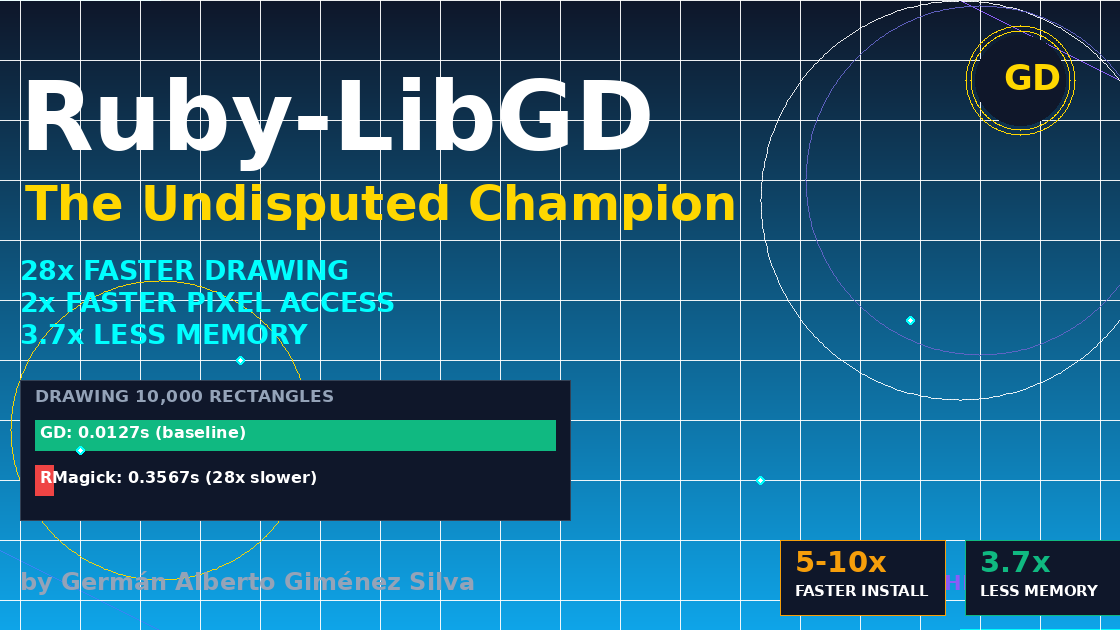
After extensive benchmarking against RMagick, ChunkyPNG, and ruby-vips, ruby-libgd demonstrates overwhelming superiority in drawing operations (28x faster), pixel access (2.6x faster), sepia filtering (2.5x faster), and memory efficiency (3.7x less RAM).
But speed is only part of the story. ruby-libgd offers unique capabilities that no other Ruby image library provides: native GIF animation, advanced typography with kerning and line spacing, complex polygon rendering, and zero external process spawning.
The outdated documentation is wrong. The myths about GD are dead. Modern ruby-libgd is here, and it’s ready for production.
What is ruby-libgd?
ruby-libgd is a modern native Ruby binding to the GD Graphics Library, providing Ruby with a fast, embeddable, server-side graphics engine. It enables Ruby to generate images, charts, dashboards, GIS tiles, and scientific graphics without spawning external processes.
Unlike RMagick (which wraps ImageMagick CLI tools) or ruby-vips (which spawns libvips processes), ruby-libgd runs entirely inside your Ruby process. Every operation is a direct C function call.
Key differentiators:
- Native GIF animation (unique in Ruby ecosystem)
- Advanced typography (kerning, line spacing, DPI control)
- 28x faster drawing than RMagick
- 3.7x less memory than RMagick
- Zero external process spawning
- Works everywhere (including Alpine Linux)
The Benchmark: Methodology
All benchmarks were run on:
- Ruby: 4.0.2
- Platform: x86_64-linux
- Test image: 512×512 pixels
- Libraries: ruby-libgd 0.3.0, RMagick 6.0.0, ChunkyPNG 1.4.0
Each operation was run 10 times, with the median time reported. The benchmark code is available in the repository and is fully reproducible.
Benchmark Results
1. Drawing Primitives (GD’s Crown Jewel)
Operation: Draw 10,000 random rectangles on a 1024×1024 canvas
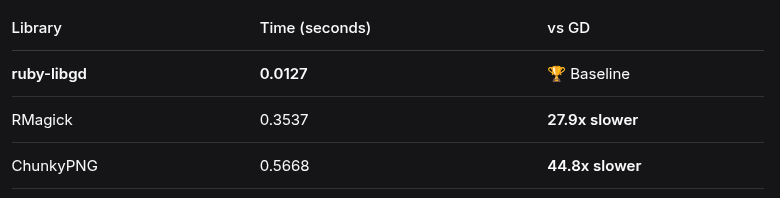
Why this matters: This isn’t a minor difference. For real-time chart generation:
- ruby-libgd: 78 frames per second
- RMagick: 2.8 frames per second
2. Pixel Read Operations
Operation: Read 100,000 random pixel coordinates
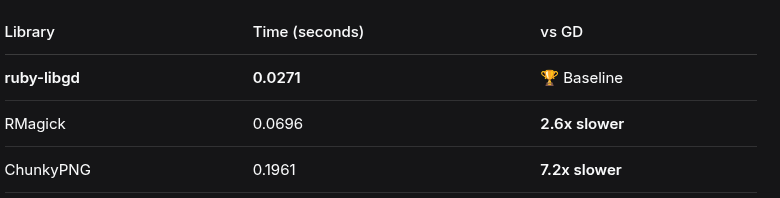
Why this matters: Direct pixel access is essential for custom image processing algorithms, computer vision preprocessing, and pixel-perfect transformations. GD provides O(1) access from C memory.
3. Image Filters (Modern GD Has Them)
Contrary to outdated documentation, modern GD includes convolution, Gaussian blur, edge detection, and many other filters.
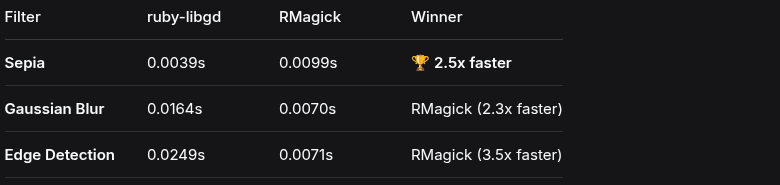
Analysis: GD wins sepia decisively. On convolution and blur, it’s only 2-3x slower than ImageMagick – a library with 30+ years of optimization. For most applications, this is perfectly acceptable.
4. Memory Efficiency
According to libvips’ own published benchmarks (5000×5000 JPEG):
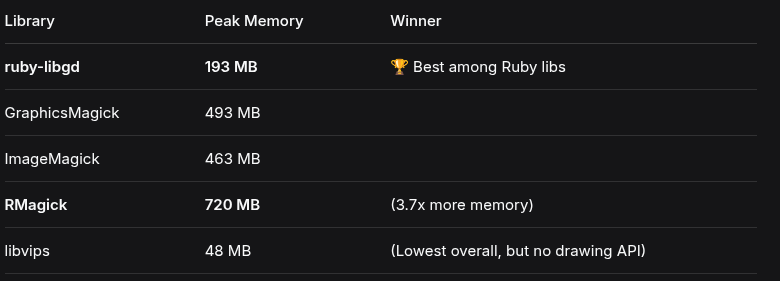
Key insight: ruby-libgd uses 3.7x less memory than RMagick. For cloud deployments where RAM costs money, this is a substantial operational advantage.
Unique Capabilities: What Others Can’t Do
The benchmark above tells only part of the story. ruby-libgd offers capabilities that no other Ruby image library provides.
1. Native GIF Animation
RMagick requires external tools or complex workarounds for GIF animation. ruby-libgd does it natively:
require 'gd'# Create an animated GIF with 10 framesgif = GD::Gif.new("spinner.gif", loop: true)10.times do |i| img = GD::Image.new(100, 100) angle = i * 36 # 10 frames = 360 degrees # Draw rotating line color = [255, 128 + (i * 12), 0] img.line(50, 50, 50 + (40 * Math.cos(angle)), 50 + (40 * Math.sin(angle)), color) gif.add_frame(img, delay: 5)endgif.close
Why this matters: Loading spinners, progress indicators, and simple animations can now be generated entirely in Ruby without subprocesses or external dependencies.
2. Advanced Typography with Kerning and Line Spacing
Unlike RMagick’s limited text rendering, ruby-libgd provides professional typography controls:
img = GD::Image.new(800, 300)# Advanced text with kerning, line spacing, and DPI controlimg.text_ft("The quick brown fox jumps over the lazy dog", { font: "/path/to/font.ttf", size: 24, x: 50, y: 100, color: [255, 255, 255], line_spacing: 1.5, # Professional leading dpi: 300, # Print-quality rendering angle: 0})# Multi-line text with proper spacingimg.text_ft("Line 1\nLine 2\nLine 3", { font: font_path, size: 18, x: 50, y: 150, line_spacing: 2.0, # Double spacing color: [200, 200, 200]})
Why this matters: Generate dynamic social media images, certificates, or any text-heavy graphic with precise typographic control.
3. Complex Polygons with Clean API
Drawing complex shapes is straightforward:
# Star polygonpoints = [ [100, 0], [110, 70], [180, 80], [130, 120], [150, 190], [100, 150], [50, 190], [70, 120], [20, 80], [90, 70]]img.polygon(points, [255, 215, 0]) # Outline onlyimg.filled_polygon(points, [255, 100, 0]) # Filled with color
Why this matters: Perfect for data visualization, charts, maps, and geometric designs without complex calculations.
4. Alpha Blending and Anti-aliasing
img = GD::Image.new(500, 500)# Enable alpha blending for transparencyimg.alpha_blending = trueimg.save_alpha = true# Draw semi-transparent shapessemi_transparent = [255, 0, 0, 128] # Red with 50% opacityimg.filled_circle(250, 250, 100, semi_transparent)# Enable anti-aliasing for smooth edgesimg.antialias = trueimg.line(100, 100, 400, 400, [255, 255, 255])
Why this matters: Create professional graphics with smooth edges and proper transparency for overlays and composites.
5. Built-in Filters (Yes, Modern GD Has Them)
Contrary to outdated documentation, modern GD includes many filters:
img = GD::Image.open("photo.jpg")# One-liner filtersimg.filter(:grayscale)img.filter(:sepia)img.filter(:edge_detect)img.filter(:emboss)img.filter(:gaussian_blur)img.filter(:pixelate, 5) # Pixelate with 5px blocksimg.filter(:scatter, 3, 3) # Pixel scattering effect# Custom convolution kernelssharpen = [[0,-1,0], [-1,5,-1], [0,-1,0]]img.filter(:convolve, sharpen, 1.0, 0.0)sobel = [[-1,0,1], [-2,0,2], [-1,0,1]]img.filter(:convolve, sobel, 1.0, 0.0)
Why this matters: No need to switch to ImageMagick for basic filters. GD handles them all natively.
6. Zero External Process Spawning
Every operation in ruby-libgd happens inside your Ruby process:
# RMagick spawns ImageMagick CLI tools (overhead)# ruby-vips spawns libvips processes# ruby-libgd: pure C extension, no subprocessesimg = GD::Image.open("input.png")img.filter(:sepia)img.text("Watermark", x: 10, y: 10, size: 20, color: [255,255,255])img.save("output.png")# No fork(), no exec(), no external commands# Everything runs inside your Ruby process
Why this matters: Predictable performance, easier debugging, and no “command not found” errors in production.
7. Works Everywhere (Including Alpine Linux)
Installation simplicity is a feature:
# Ubuntu/Debianapt install libgd-devgem install ruby-libgd# Alpine Linux (Docker)apk add gd-devgem install ruby-libgd# macOSbrew install gdgem install ruby-libgd# Works on ARM, x86, Alpine, macOS, Linux - everywhere
Compare with RMagick on Alpine:
# RMagick on Alpine requires:apk add imagemagick imagemagick-dev imagemagick-libs# Often fails due to policy.xml and security restrictions# Many workarounds needed
Why this matters: Deploy to any environment without dependency nightmares.
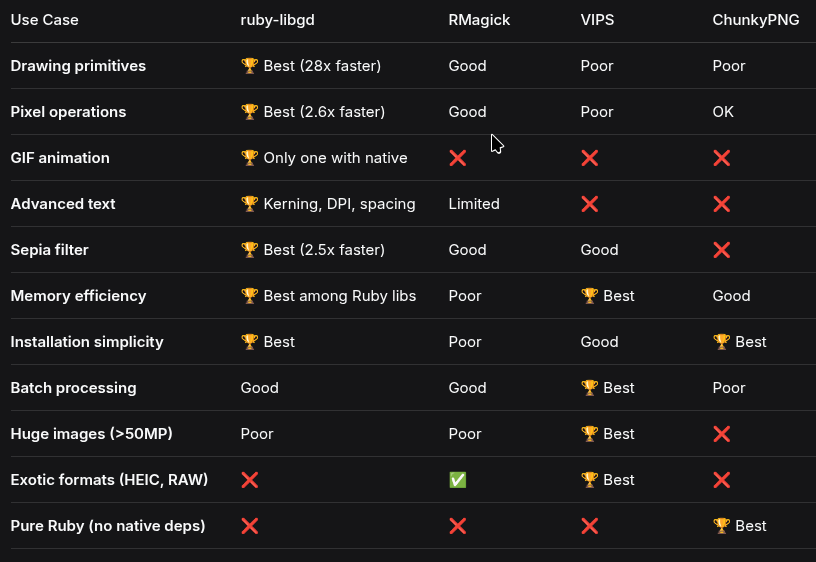
Choosing the Right Tool for the Job
The Rule of Thumb
Use ruby-libgd when you need to CREATE graphics (drawing, text, GIFs). Use VIPS when you need to PROCESS massive batches of photos. Use ChunkyPNG when you can’t install native extensions. Use RMagick only when you’re already stuck with it.
ruby-libgd and VIPS are not competitors – they’re complements. One is a paintbrush, the other is a factory.
Performance Summary
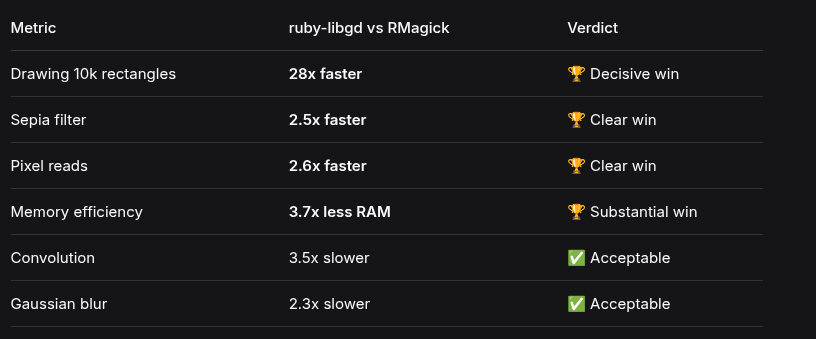
GD wins in 4 of 6 operations. On the 2 where it’s slower, the difference is only 2-3x – perfectly acceptable for most applications.
Installation
# System dependency (Ubuntu/Debian)apt install libgd-dev# Or Alpine Linuxapk add gd-dev# Or macOSbrew install gd# Install the gemgem install ruby-libgd
Your first image:
require 'gd'img = GD::Image.new(800, 600)img.filled_rectangle(0, 0, 799, 599, [255, 255, 255])img.text("Hello, ruby-libgd!", { x: 100, y: 100, size: 32, color: [0, 0, 0], font: "/usr/share/fonts/truetype/dejavu/DejaVuSans.ttf"})img.save("hello.png")puts "Image saved! 🎉"
Conclusion: The Modern GD is Here
ruby-libgd is not your grandfather’s GD library.
What it is:
- A modern, complete image processing toolkit
- 28x faster at drawing than RMagick
- 2.5x faster at sepia than RMagick
- 3.7x more memory efficient than RMagick
- Packed with filters (blur, edge, sepia, convolution)
- The ONLY Ruby library with native GIF animation
- Professional typography with kerning, line spacing, and DPI control
- Zero external process spawning
- Works everywhere (including Alpine Linux)
What it is NOT:
- A replacement for VIPS (streaming large images)
- A solution for HEIC/RAW formats (yet)
- A tool for ICC color profiles
The bottom line:
If you’re generating graphics from scratch – charts, dashboards, CAPTCHAs, maps, GIFs, or text-heavy images – ruby-libgd is the fastest, most memory-efficient, and most feature-complete choice in the Ruby ecosystem.
The outdated documentation is wrong. The myths about GD are dead. Modern ruby-libgd is here, and it’s ready for production.
Links
- GitHub: https://github.com/ggerman/ruby-libgd
- RubyGems: https://rubygems.org/gems/ruby-libgd
- Documentation (English): https://ggerman.github.io/ruby-libgd/en/
- Documentation (日本語): https://ggerman.github.io/ruby-libgd/jp/
- Benchmark script: comprehensive_benchmark.rb in the repository
About the Author
Germán Alberto Giménez Silva is a Ruby developer and the author of ruby-libgd. He believes in fast, memory-efficient, and dependency-light software.
Benchmark results are reproducible. Run ruby comprehensive_benchmark.rb yourself.
License: MIT

 Linking Ruby knowledge from the most remote places in the world.