

December 18, 2024
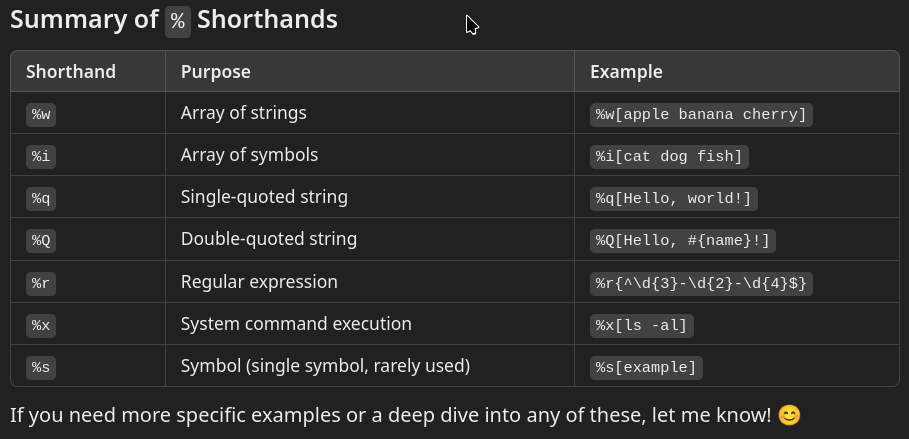
Ruby is renowned for its expressive and concise syntax, and one standout feature is its shorthand notations for creating arrays, strings, symbols, and more. If you’re a Ruby developer looking to write cleaner and more readable code, understanding these shorthands like %w, %q, %i, and others is essential.

Here’s a deep dive into these powerful tools and how to use them effectively.
Do you need more hands for your Ruby on Rails project?

1. Creating Arrays of Strings with %w
The %w shorthand lets you create an array of strings without needing quotes or commas. This is perfect for lists of words or simple strings.
# Example
fruits = %w[apple banana cherry]
puts fruits.inspect # => ["apple", "banana", "cherry"]
- Whitespace separates the elements.
- Use escape sequences (e.g., \ ) for strings containing spaces.
fruits = %w[red\ apple green\ grape]
puts fruits.inspect # => ["red apple", "green grape"]
2. Defining Arrays of Symbols with %i
The %i shorthand is similar to %w but creates symbols instead of strings. This is useful for representing identifiers or labels.
# Example
animals = %i[cat dog fish]
puts animals.inspect # => [:cat, :dog, :fish]
3. Single-Quoted Strings with %q
Use %q for single-quoted strings. It behaves like single quotes, meaning it doesn’t process interpolation or most escape sequences.
message = %q[It's a sunny day!]
puts message # => It's a sunny day!
4. Double-Quoted Strings with %Q
Use %Q for double-quoted strings. This allows interpolation and escape sequences, just like double quotes.
name = "Alice"
message = %Q[Hello, #{name}!]
puts message # => Hello, Alice!
5. Custom Delimiters
Ruby allows flexibility with delimiters when using % syntax. You can choose () {} [] <> or even custom characters.
# Examples
array = %w{apple banana cherry}
puts array.inspect # => ["apple", "banana", "cherry"]

string = %Q<Hello, #{name}!>
puts string # => Hello, Alice!
6. Using %r for Regular Expressions
The %r shorthand simplifies regular expressions, especially when the pattern contains slashes, avoiding the need for escape sequences.
regex = %r{/users/\d+}
puts regex.match("/users/123") # => #<MatchData "/users/123">
7. Executing System Commands with %x
The %x shorthand runs system commands and returns the output as a string.
output = %x[ls -al]
puts output
8. One-Time Symbols with %s
The %s shorthand creates a single symbol. It’s rarely used but can be handy in specific scenarios.
symbol = %s[example]
puts symbol.inspect # => :example
Conclusion

Ruby’s shorthand notations offer a clean and efficient way to define common data structures and strings. By incorporating these techniques into your Ruby code, you can reduce boilerplate and enhance readability, making your code both elegant and expressive.
What’s your favorite Ruby shorthand? Share your thoughts or examples in the comments!

 Linking Ruby knowledge from the most remote places in the world.